
Getting started with Listo takes just a few minutes. You'll create your account, start your free trial, and answer a few quick questions about your business so Listo can set things up for you.
Create your account
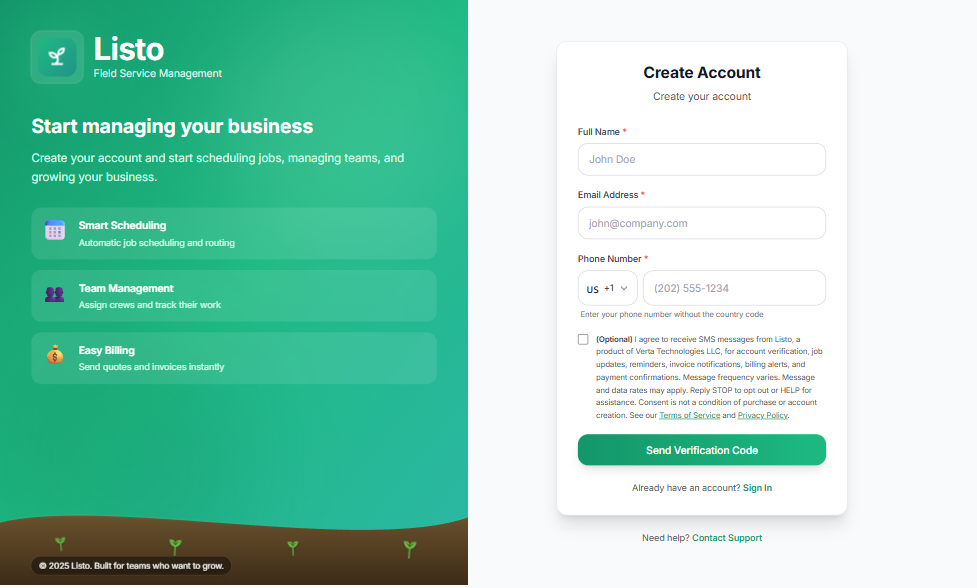
- 1Go to the signup page and enter your Full Name, Email Address, and Phone Number, then click Send Verification Code.
- 2Check your inbox for a 6-digit verification code and enter it. If it doesn't arrive, use Resend Code.
- 3Once verified, enter your Organization Name and create a password (at least 8 characters), then click Create Account.
- 4You'll be taken to secure checkout to start your 14-day free trial. Your card is not charged until the trial ends, and you can cancel anytime.
The business setup wizard
The first time you log in, Listo walks you through a short setup wizard so your account matches how you work.
- 1Name Your Business — confirm your business name and pick your timezone (Listo auto-detects it for you).
- 2What do you do? — choose your industry: Lawn Care, Landscaping, Cleaning, Pest Control, Plumbing, HVAC, Electrical, Painting, Pool Service, or Other.
- 3Sample data — choose "Yes, load sample data" to explore Listo with example clients, a team, and jobs you can delete later, or "No thanks, start fresh" to begin with a clean slate.
- 4Click Launch my account and you'll land on your new Dashboard.
Tip: Loading sample data is the fastest way to learn Listo. You can play with scheduling, routing, and invoicing risk-free, then clear it all when you're ready for real clients.
Your onboarding checklist
As the account owner, you'll see a setup checklist on your Dashboard with guided steps — adding your team, importing clients, creating your first job, and connecting payments. Work through it at your own pace; each item includes a quick guided tour.