
Field workers get a purpose-built mobile experience — on iOS, Android, or any phone browser. When someone with the FIELD role logs in, Listo takes them straight to their day.
The Today screen
Today lists the crew member's jobs in optimized route order, numbered stop by stop. Each job card shows the client, service, time, status, and address, plus everything needed to do the work:
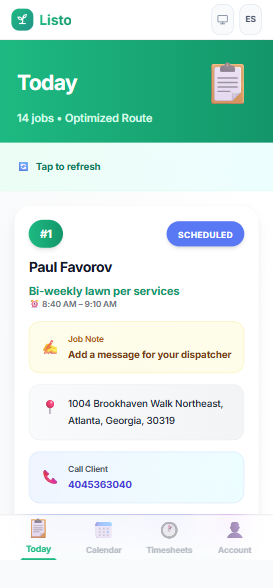
- Navigate — opens Apple Maps or Google Maps with the address ready to go.
- Call Client — one tap when a phone number is on file.
- Check In / Check Out — timestamps arrival and departure at the stop.
- 📸 Photos — attach before/after shots to the job.
- Job Note — send a message to the dispatcher, timestamped on the job.
- Complete — marks the job done; depending on company settings, the invoice can be created or sent automatically.
Tip: The Today screen refreshes itself every couple of minutes, and push notifications (Enable Notifications when prompted) alert crews when jobs are added, routes change, or work is canceled.
Calendar
The Calendar tab shows the crew's month or week at a glance. Tap any date to see that day's jobs as a list or on a map — handy for planning ahead.
Account
- See your profile, role, and team.
- Toggle "Share location with team" so dispatch can see you on the live map (updates about every 5 minutes while the app is open).
- Switch between English and Spanish with the language toggle.
- Logout when you're done.
If your company uses time tracking, a Timesheets tab appears too — see the time tracking guide for how clocking in and out works.